To login to your WordPress domain, put "/wp-admin" after your domain.
Example: yourdomain.com/wp-admin
If you installed your WordPress through our WordPress installer, you can access your WordPress 2 different ways as well:
From your client area:
1. Click on your product
2. Click on "WordPress Manager" under "Quick Shortcuts"
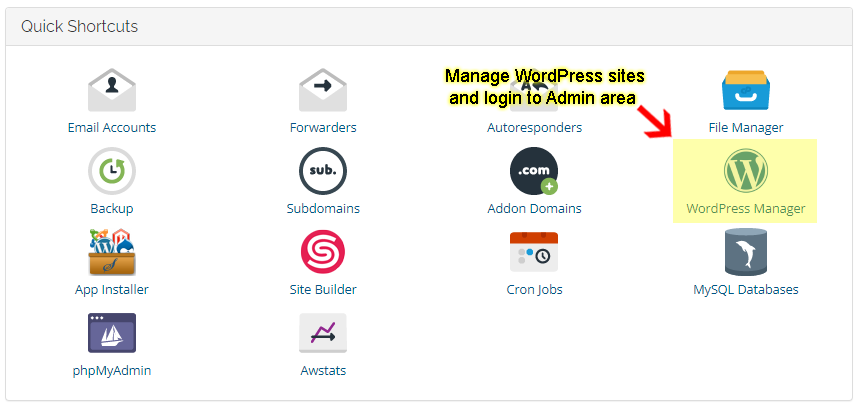
3. Click "Login" on your desired WordPress website and it will automatically take you to your WordPress admin panel.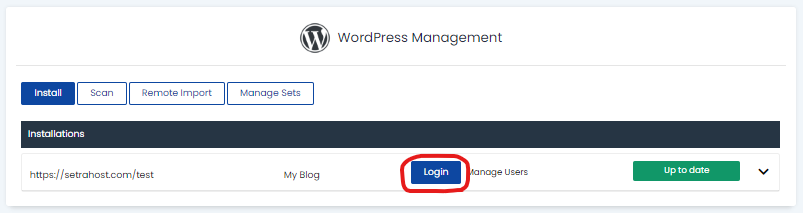
From cPanel Control Panel:
1. Scroll down and locate the "Software" section
2. Click on "WordPress Manager"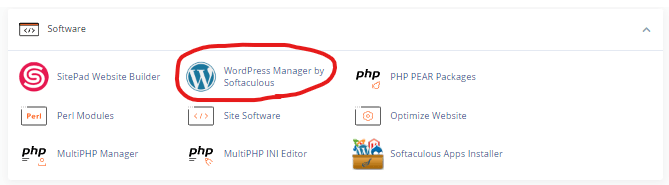
3. Click "Login" on your desired WordPress website and it will automatically take you to your WordPress admin panel.